
Description
About the Victron Cerbo GX MK2
A communication center that integrates all Victron components: monitors and controls inverters/chargers, MPPTs, batteries, tanks, and the generator, both locally and remotely via VRM. Control via a GX Touch screen (sold separately), an MFD, or the VictronConnect app.
Victron Cerbo GX MK2
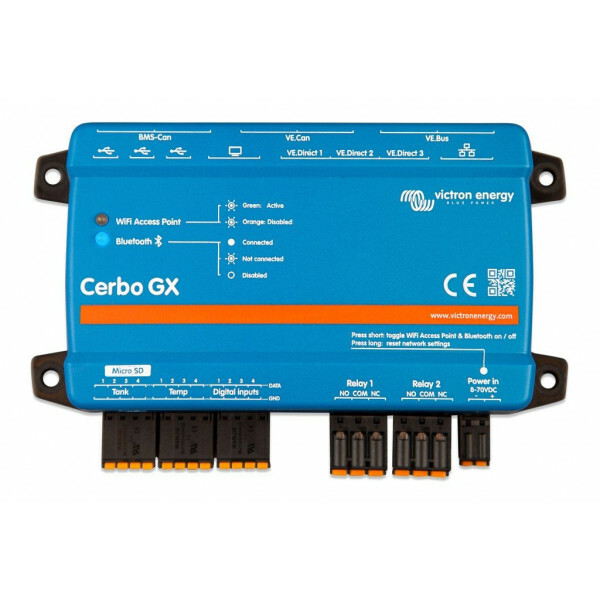
The Cerbo GX MK2 is Victron Energy’s most widely used GX device and serves as the system’s communication hub. All system components—inverters/chargers, MPPT charge controllers, batteries, shunts, and supported third-party devices—are connected to it and can be monitored and controlled via the VRM portal, a separately available GX Touch screen, an MFD, or the VictronConnect app. The MK2 is the second generation of hardware featuring two full-featured VE.Can ports, three fully functional USB ports, and pulse counting on the digital inputs.
Applications
From a single MultiPlus in a camper to a multi-phase ESS installation with managed lithium: this is the device that keeps everything working together and gives you insight and control from any location. The extra-isolated VE.Can port enables combinations that were difficult to achieve with the previous generation—for example, a Lynx Smart BMS and an RV-C in a single system. For installers, this means fewer compromises when developing a system design.
- ESS and Home Battery: Scheduled Charging, Peak Shaving, and Solar Forecasts via VRM
- Off-grid and backup: automatic generator start/stop with quiet periods
- Marine: MFD Integration, Signal K, and NMEA 2000
- RV, commercial vehicle, and emergency response vehicle, including RV-C
- Hybrid power generators and remote management of large numbers of systems
Differences from the first-generation Cerbo GX
- Two full-featured CAN bus ports (VE.Can 1 and VE.Can 2) instead of one VE.Can and one BMS-Can
- VE.Can 1 is isolated; in the previous generation, none of the CAN ports were isolated
- All three USB ports are fully functional; the GX Touch can be connected to any port
- The digital inputs can count pulses
- The RJ45 jacks are rotated 180 degrees, making it easier to remove cables
Connections and Interfaces
- 3x VE.Direct (always isolated), up to 15 VE.Direct devices in total
- VE.Bus via two RJ45 sockets connected in parallel (isolated)
- VE.Can 1 is isolated and VE.Can 2 is not isolated
- 10/100 Ethernet RJ45, insulated except for the shield
- Wi-Fi with an access point and Bluetooth
- 3 USB-host ports and a microSD card slot
- 2x NO/NC relays
- 4 resistive tank-level inputs, 4 temperature inputs, 4 digital inputs
Tank transmitters and temperature sensors are not included. Relay 1 can be programmed as an alarm relay, generator start/stop, tank pump, temperature-controlled relay, or manual control; relay 2 can be programmed as a temperature-controlled relay or manual control.
Monitoring and Control
Battery status, power consumption, PV output, generator and grid power, tank levels, and temperatures—all in a single overview. Set the shore power limit, automatically start or stop generators, or adjust any settings. Alarms and notifications are fully configurable.
Using the Remote Console on VRM, you can control the device remotely as if you were standing right in front of it—whether via the local network or through the built-in Wi-Fi access point. Without an internet connection, data remains logged locally; you can store more data on a microSD card or USB flash drive and upload it to VRM later.
Integrations
- VRM portal with widgets for iOS and Android, customizable data windows, and alerts
- Marine MFD App and NMEA 2000 Integration
- RV-C Entry and Exit for RVs and Commercial Vehicles
- Node-RED Automation via Venus OS Large
- Deep integration with supported third-party lithium batteries
- Modbus-TCP and MQTT for integration with external systems
Assembly and Display
The device is mounted on a wall or on a 35 mm DIN rail using the separately available DIN35 small adapter. All ports are easily accessible. The accompanying GX Touch screen is sold separately, connects with a single cable, and is screwed onto the top of a panel or dashboard—no need to cut a hole. A flush-mounted version of the screen is also available.
Reviews
There are no reviews yet.